 Photo Cleaner
Your camera roll is a mess.
Swipe it clean.
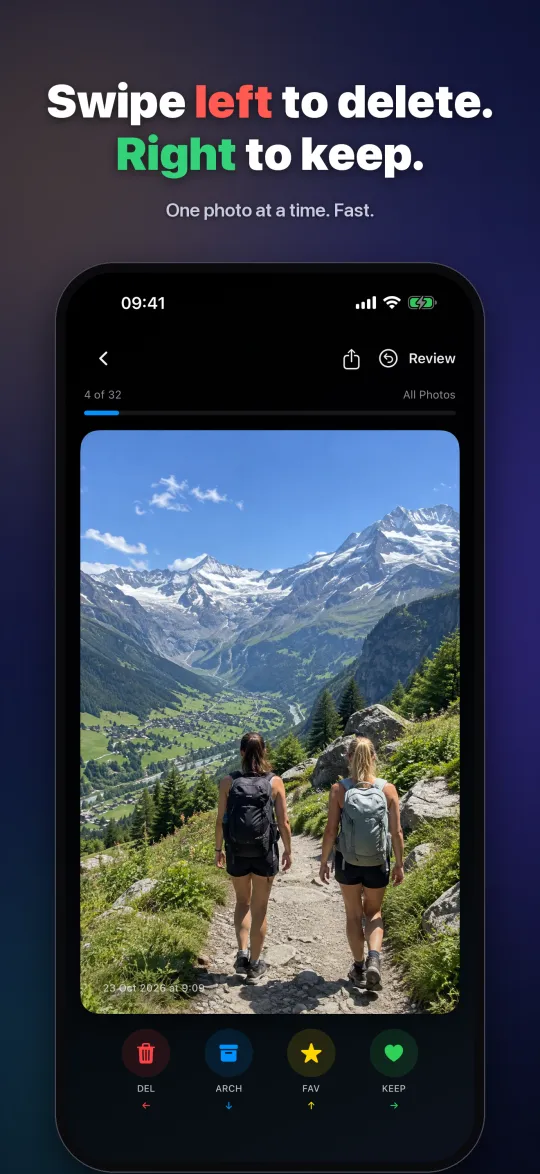
One photo at a time: left to bin it, right to keep it. Keep the best of every burst, shrink those giant 4K videos, and lock the private stuff away. No weekly subscriptions, no ads, nothing collected.
- No data collected
- No account
- No ads
- Photos never leave your phone
Free to use: 50 cleanups a day. iPhone: iOS 17 or later. Android: version 11 or later, a direct download (version 0.6.0, 80 MB); your phone will ask once to allow installing it. Speaks your phone's language: 48 languages on iPhone, 11 on Android.
Broke up?
Tag them. Delete them.
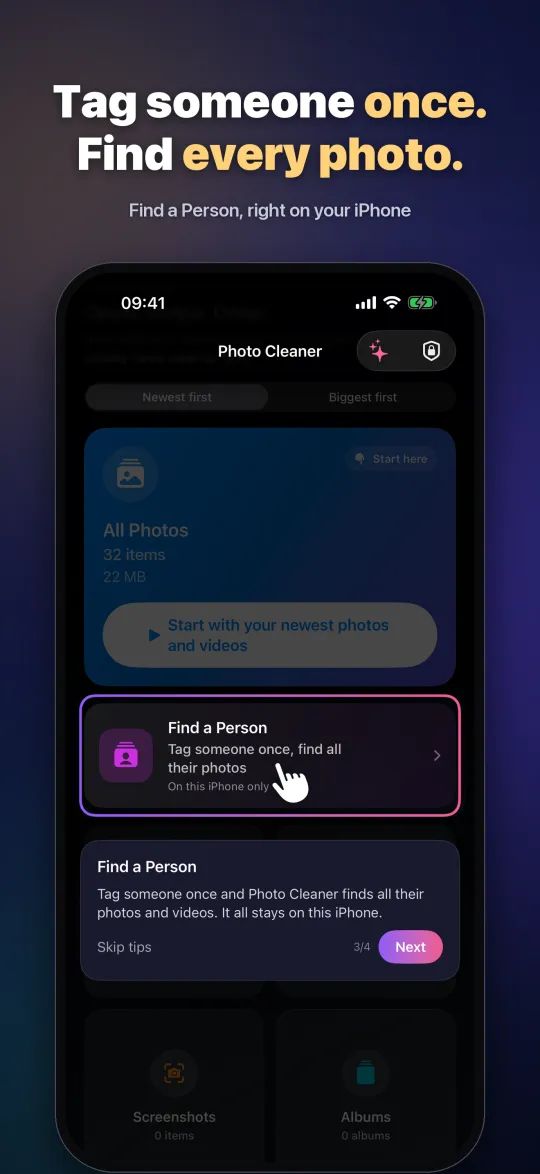
Tap their face once and Photo Cleaner finds every photo and video of them in seconds, even in 20,000 photos. Then delete them in one go, or vault them if you're not ready. Deleted photos wait in Recently Deleted for 30 days, just in case.
- Works for the good ones too: find every photo of your mum, your brother, the kids
- Matched on your phone. Faces are never uploaded
- Press play for the 30-second story
Your photos stay yours
Most cleaner apps track you. Ours can't, because we never built anything that collects. Nothing to sell, nothing to leak.
The full, plain-English version: privacy policy.
What it does
Swipe to decide
Left to bin it, right to keep it. Up for a favourite, down to tuck it in the archive.
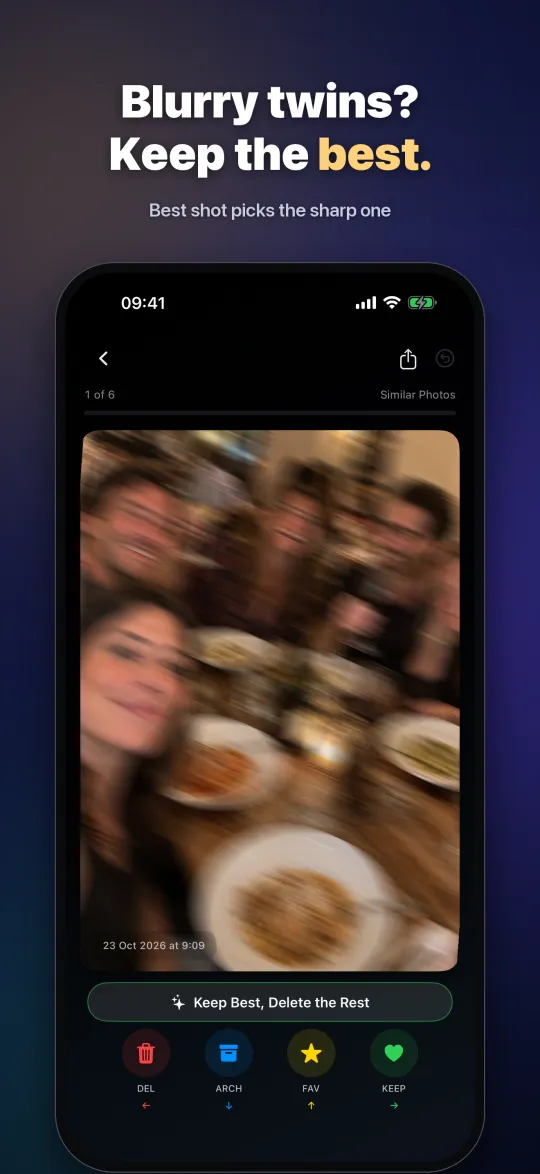
Keep the best of each
Ten shots of the same sunset? One tap keeps the sharpest of each bunch. You still get a look before anything goes.
Find a person
Tag someone once, your ex or your mum, and every photo of them turns up in seconds. Keep them, delete them all, or lock them away. Faces never leave your phone.
Shrink big videos
4K videos eating your storage? Make Full HD copies, same date, same place, and often get tens of gigabytes back. Leave the app, it keeps going.
Small piles, quick wins
Live Photos you never play into normal photos (you pick which), screenshots older than a month, screen recordings, the blurry ones.
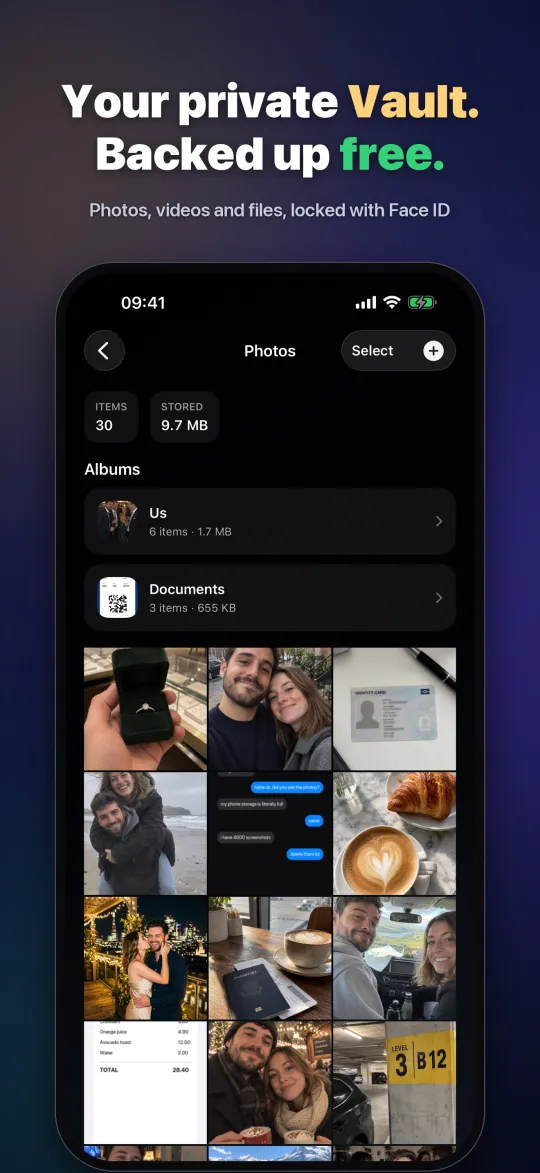
A private vault
For what shouldn't sit in your camera roll. Albums, folders, Face ID, and a backup in your own iCloud.
Why us, honestly
| US App Store prices | Photo Cleaner | Cleanup | Swipewipe | CleanMy®Phone | Clever Cleaner |
|---|---|---|---|---|---|
| Yearly plan (lowest listed) | $9.99 | $29.99 | $29.99 | $19.99 | none listed |
| Weekly plans | None | Yes, up to $11.99 a week | Yes | None listed | Yes, $6.99 a week |
| One-time purchase | $24.99 | none listed | not clear from the listing | not clear from the listing | $39.99 |
| "Contains Advertising" on the App Store | No | No | Yes | No | No |
| Privacy label: "Data Used to Track You" | No: Data Not Collected | Yes | Yes | Yes | Yes |
US App Store prices in US dollars, from each app's US App Store listing, checked 19 November 2026: Cleanup, Swipewipe, CleanMy®Phone, Clever Cleaner, Photo Cleaner. Prices vary by country and change over time; privacy labels are provided by each developer.
Have a look
The honest bit
- 50 cleanups every day
- Swiping, Similar Photos, Find a Person
- The private Vault
- Shrink videos one at a time
- Unlimited cleanups
- Shrink all your big videos in one go
- Any file in your Vault
- Family Sharing · 3 days free to try
That's it. No weekly plan, no ads, no account. CHF 9.90 / 24.90 in Switzerland; your App Store shows your currency. On Android, Pro is CHF 9.90 once (about US$11), paid through Stripe.
Guides
Short, honest how-tos for the things people ask most.
- iPhone storage full?
Where the space goes and how to get it back - Don't want to pay for iCloud?
Free up gigabytes on the phone itself - Duplicate and similar photos
Merge copies and keep the best of each burst - Compress iPhone videos
Full HD copies that keep the date and place - Every photo of one person
Your mum, a friend, the kids, in seconds - Delete every photo of your ex
In one go, or vault them if you're not ready - Hide private photos on iPhone
The Hidden album vs a private vault - A cleaner with no weekly subscription
What a fair price looks like, compared - Do cleaner apps collect your data?
How to read the App Store privacy label - Photo Cleaner for Android
No ads, no internet permission, Android 11+
Questions
How much does Photo Cleaner cost?
It's free for 50 cleanups a day, with no ads. Pro on iPhone is US$9.99 a year (3 days free to try) or US$24.99 once, and works with Family Sharing. In Switzerland that's CHF 9.90 or CHF 24.90; your App Store shows the price in your own currency. On Android, Pro is CHF 9.90 once (about US$11). There's no weekly plan.
Do you collect any of my data?
No. Photo Cleaner's App Store privacy label is "Data Not Collected". There's no account, no analytics, no tracking and no ads, and we don't run a server your photos could go to. On Android, the app doesn't even have permission to use the internet. We couldn't see your photos if we wanted to.
Are my photos or faces uploaded anywhere?
No. Swiping, finding similar photos, face matching and compressing all happen on your phone. Face data stays on the phone too, and you can delete it in the app at any time. On iPhone, the only time anything goes online is Apple's own: downloading a full-size original from your iCloud Photos, a purchase through the App Store, or a Vault backup to your own iCloud if you turn it on.
Can anyone else open my Vault?
It's locked with Face ID, your fingerprint or your phone's passcode, and it isn't in your camera roll, so other apps and people scrolling your Photos can't see it. We can't open it either: it's on your phone (and, if you choose, in your own iCloud), never with us.
Will it delete anything without asking?
No, on iPhone or Android. Swiping only marks things; you check them all on the review screen first. Then your phone asks once more: on iPhone, iOS asks and the photos go to Recently Deleted for 30 days; on Android, Android shows its own "Move to trash?" and they stay in your phone's trash for 30 days. Nothing is ever deleted in the background.
Does it work on iPad or Mac?
Not yet. Photo Cleaner is made for iPhone (iOS 17 or later), plus a separate app for Android 11 or later. There's no iPad or Mac version yet: on an iPad it runs as the iPhone app, in a phone-sized window. A proper iPad and Mac version is planned.
Is this the same as other apps called Photo Cleaner?
No. Several apps have similar names. Ours is Photo Cleaner: Swipe & Vault by awbs, made in Geneva. On the App Store its ID is 6761284389, and its website is photocleaner.net.
Which languages is it in?
It simply follows your phone's language, with no setting to change. On iPhone that's 48 languages, from English, French, German, Italian and Spanish to Arabic, Hindi, Japanese, Korean and Chinese. On Android it's 11 for now: English, French, German, Italian, Spanish, Portuguese (Brazil), Dutch, Russian, Japanese, Korean and Chinese (Simplified). Want a different language just for Photo Cleaner on iPhone? Settings → Apps → Photo Cleaner → Language.
What does "Shrink big videos" lose?
It makes a Full HD copy of a 4K video. On a phone it looks the same; you only lose the extra sharpness you'd see on a big TV. The date, place and albums stay.
Is the Vault backed up?
iPhone: turn on iCloud Backup in the Vault and it goes to your own iCloud, so it comes back on a new iPhone. Without it, the Vault lives only on this phone. Android: the Vault goes into your phone's own Android backup (end-to-end encrypted by Google when your phone has a screen lock), so it comes back when you set up a new phone from your old one. Google's cloud backup only keeps about 25 MB per app, so for a bigger Vault use Back up Vault: one password-locked file you save wherever you like, such as Google Drive, your computer or a USB stick, and open on any phone with Restore Vault. The app itself still never goes online.
How do I install it on Android?
Tap "Download for Android", open the file, and allow your browser to install apps when your phone asks (only this once). It's not on Google Play yet, so it comes straight from us. It needs Android 11 or later and never goes online: no internet permission at all. To update, download the new version here and install it over the old one; everything stays, because each version is signed with the same key. In the app, Privacy & Info → Check for updates brings you here.
How does Pro work on Android?
It's a one-off CHF 9.90, no account and no subscription:
- In the app, tap Get Pro. Stripe's secure payment page opens in your browser.
- Pay once. You land on a thank-you page with your personal unlock code.
- Tap Open Photo Cleaner on that page and Pro switches on. If it doesn't open, copy the code, then in the app tap Get Pro → I already have a code and paste it.
The code is yours for good. On a new phone set up from your old one, Pro usually comes back by itself with your Android backup; otherwise just paste the code again. Lost it? The restore page shows it again with your email and the last four digits of your card.
Can I check the Android download is genuine?
Yes. Only download it from photocleaner.net or awbs.ch. Every copy is signed with our private key, and Android refuses to install an update unless it carries that same signature, so nobody can swap in a fake version later. Google Play Protect also checks it when you install. And the app has no internet permission at all, so it can't send your photos anywhere even if it wanted to.
For the technically minded: the file's SHA-256 is b2df7efac068184befb61c21bb0c4afbe96ecb96b1ec2dde61b477a13b7f50ba and our signing certificate's SHA-256 is 680efc5372efcbc8509796903d59687b216a4d8f2bc6807ef8648479cbc83bf6.
Ready to get your space back?
Free to start, 50 cleanups a day. No account, nothing collected.